Wireframe
The designs you received are called wireframes (sometimes called wires, mockups, or mocks).
Wireframes serve multiple purposes by helping to: Connect the site’s information architecture to its visual design by showing paths between pages. Clarify consistent ways for displaying particular types of information on the user interface. Determine intended functionality in the interface.

So how to Wireframe a Website in a few steps?
1. Gather the Tools for Wireframing
2. Do Your UX Design Research
3. Determine Your Optimal User Flows
4. Start Drafting Your Wireframe
5. The final step is to Test to Try Out Your Design
6. Turn Your Wireframe Into a Prototype

Whichever tool you choose, you’ll want to put your prototype through another round of user testing once it’s complete. After your prototype has passed, you can get to building your actual site with the confidence that your UX will be top-notch right from your launch date.
Mozilla HTML Basics
HTML (HyperText Markup Language) is the most basic building block of the Web. It defines the meaning and structure of web content. … HTML uses “markup” to annotate text, images, and other content for display in a Web browser, and the picture below show the anatomy of an HTML element :
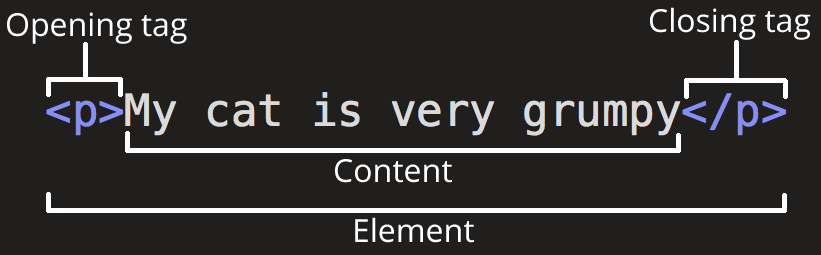
Here are the fetures of an HTML :
- Features of HTML:
- It is easy to learn and easy to use.
- It is platform-independent.
- Images, videos, and audio can be added to a web page.
- Hypertext can be added to text.
- It is a markup language.
Semantics
Semantics in general meaning is the study of meaning of words. People can absolutely interpret words differently and draw different meanings from them.