HTML Structure :
HTML is the standard markup language for creating Web pages its also consists of a series of elements that tell the browser how to display the content.
we use structure in webpages to make it easier for the user to read through website as the MS-word also have a specific tools to structure your pages in a more convenient way to read.
For instance, we use some elements in HTML such as (<h1> , <h2> , <div> , ….) and many others to distinguish between the topics and the paragraph it self. Each element has an opening tag and a closing tag as shown in the picture below :
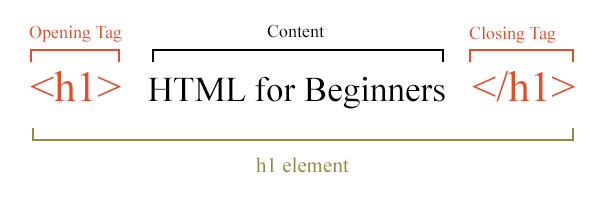
So tags act like containers. They tell you something about the information that lies between their opening and closing tags.
Attributes:
Attributes provide additional information about the contents of an element made up of two parts: a name and a value, separated by an equals sign as shown below :

Body, Head & Title
Each one of them contain a specific tags and info.
<Body> this tag contains everything shown in the page. (<h1>, <p> , <div> , <section> , etc …)
<Head> this tag only include the title of the page.()
In shorten words to learn HTML you need to know what tags are available for you to use, what they do, and where they can go.
Extra Markup
Markup is what HTML tags do to the text inside of them; they mark it as a specific type of text. For example, markup text could come in the form of boldface or italicized type to draw specific attention to a word or phrase.
The evolution of HTML :
There’s different versions of HTML since the web was first created such as : (HTML4, XHTML 1.0,HTML5) Each new version was designed to be an improvement on the last.
DOCTYPES :
we use the tag called (!DOCTYPE …) to tell the browser which version o HTML that we are currently using.
COMMENTS :
we use this tag to type a comment in HTML :
ID Attribute:
The id attribute specifies a unique id for an HTML element. The value of the id attribute must be unique within the HTML document as shown here :

Class Attribute:
in shorten words The class attribute specifies one or more class names for an HTML element.
Block & Inline elements:
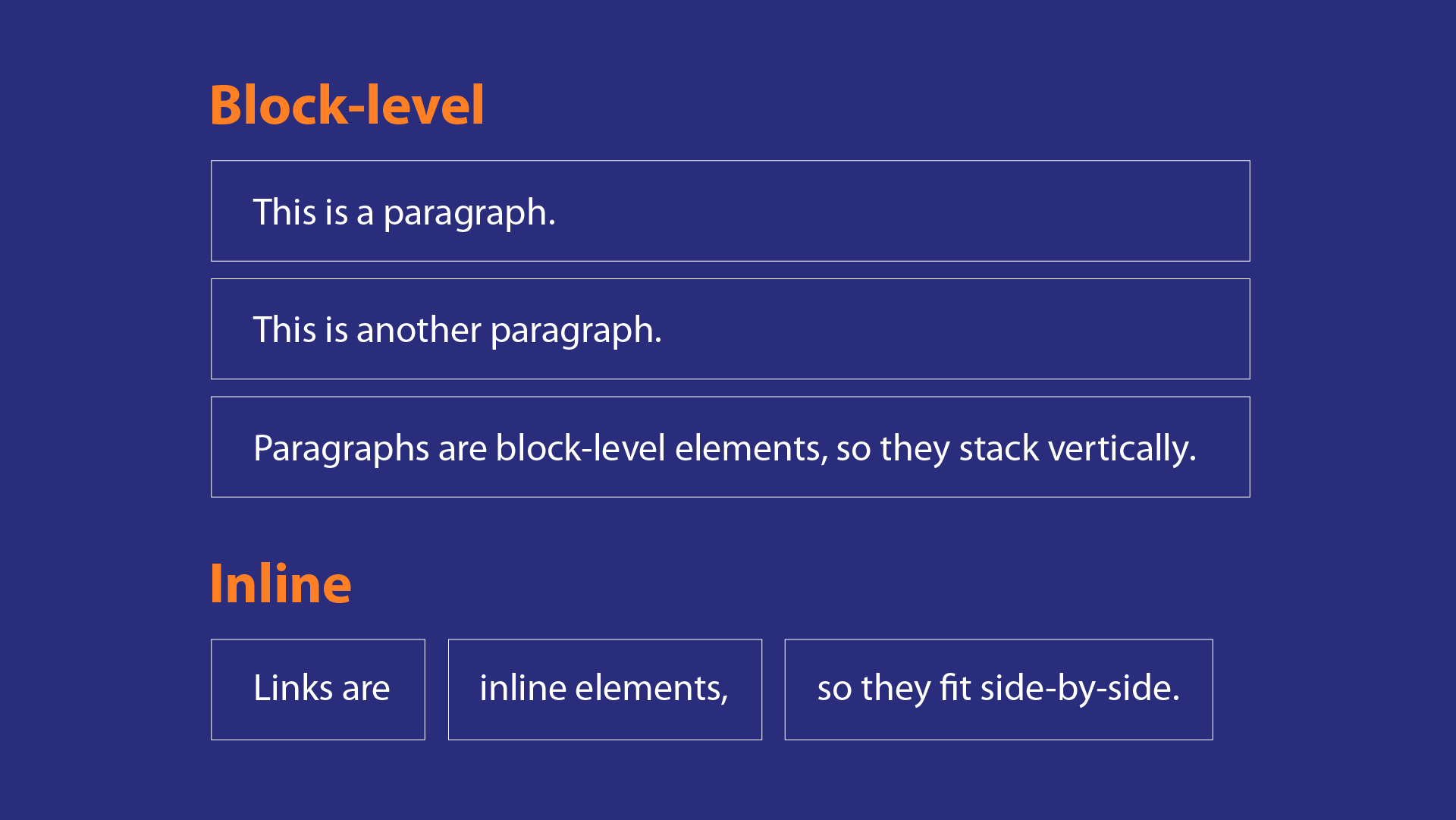
Some elements will always appear to start on a new line in the browser window. These are known as block level elements. and some others appear in one line and known as Inline block elements.
Grouping Text & elements :
<div> This tag allows you to group a set of elements together in one block-level box.
**** This one is much like the <div> element, but <div> is a block-level element and is an inline element.
Info about webpages :
The tag allows you to supply all kinds of information about your web page.
HTML5 Layout
HTML5 offers new semantic elements that define different parts of a web page: <header> - Defines a header for a document or a section. <nav> - Defines a container for navigation links. <section> - Defines a section in a document. <article> - Defines an independent self-contained article.

Headers & Footers :
The HTML5 Header element is typically the first element after the beginning of the body element in an HTML5 web page
The HTML5 Footer is placed at the end of an HTML5 page. It holds “end of page” stuff, like navigation bars (which should be enclosed in HTML5 tags, within the header).
Navigation & articles :
(Navigation) : The <nav> HTML element represents a section of a page whose purpose is to provide navigation links, either within the current document or to other documents
(Articles) : The <article> HTML element represents a self-contained composition in a document, page, application, or site, which is intended to be independently distributable or reusable
Sections & Heading groups:
The <section> element is a structural HTML element used to group together related elements. Each <section> typically includes one or more heading elements and additional elements presenting related content.
The <hgroup> tag in HTML is used to wrap one or more heading elements from <h1> to <h6>, such as the headings and sub-headings.
Note : In order to make HTML5 work with internet explorer 8, we need Java Script whic is available to download for free using google.
Process and design
we need to know who’s the tareget audience and we need to meet their expectations of what the want from our site and how many times your audience visit our website.
After knowing what you want to achieve, now moving to the next step which is design and organise the information in our website to meke it readable for the audience using something called Site Map.

Wire Frames :
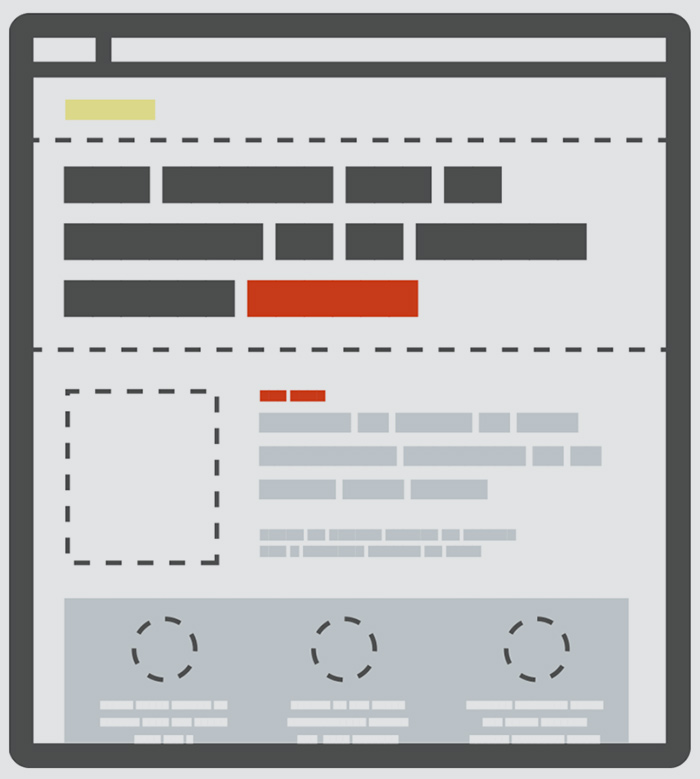
A wire frame is a small sketch which represents how our pages should look like and shows the basic elements, also they are not interactive, and do not show much detail, but create a simple design that guides the project.

Visual Hierarchy :
Hierarchy is a visual design principle which designers use to show the importance of each page/screen’s contents by manipulating these characteristics: Size – Users notice larger elements more easily. Color – Bright colors typically attract more attention than muted ones.
Grouping and Similarity :
##### If you group similar or related info beside each other it will make the design more easier to comprehend. this can be done in several ways (proximity, color, borders, white space, etc…).
##### Repetition of similar color, size, orientation, texture, font, or shape, suggests that matching elements have similar importance or meaning.
### Designing Navigation :
##### This will help the user to understand where they are and find the info they need more easily. and the good navigation principles are (concise, clear, selective, Context, Interactive, Consistent)
Java Script
##### JavaScript is a lightweight, interpreted, object-oriented language with first-class functions,and is best known as the scripting language for Web pages, but it’s used in many non-browser environments as well and can function as both a procedural and an object oriented language.
The ABC of programming:
writing a script :
You need to define what the goal you want to achieve then start with designing a script followed by coding each step by writing with the language that the coputer understand such as Java Script.

Computers and connection to the world :
In computer programming, each physical thing in the world can be represented as an object.
Events :
Programmers choose which event s they respond to. When a specific event happens, that event can be used to trigger a specific section of the code.
METHODS
The code for a method can contain lots of instructions that together represent one task.
So we can put them all together :
Computers use data to create models of things in the real world. The events, methods, and properties The same way the internet connects us, there are special web languages that work together to make up the internet and the websites it contains. HTML, CSS and JavaScript work together to form the front-end design of a website by applying information that affects content, style and interactivity of a site.
How to link java with HTML and CSS?
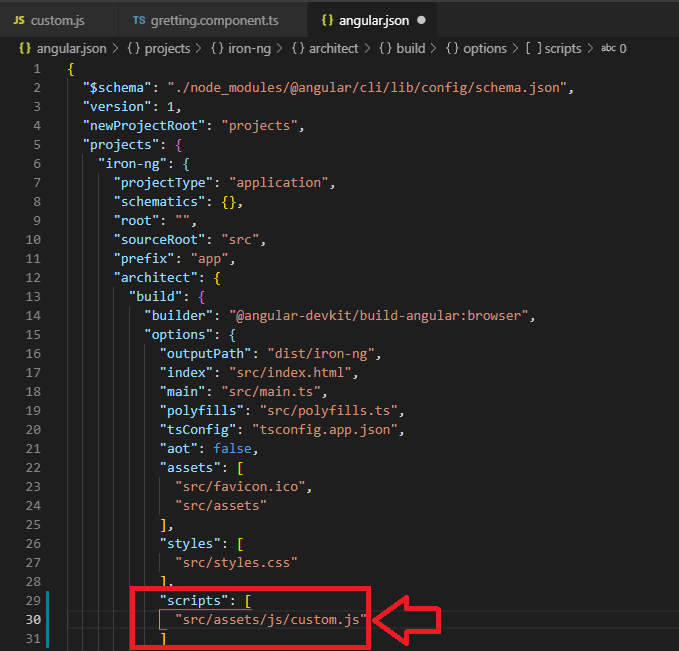
To link a CSS file with your HTML file, you have to write the next script on your HTML file inside the head tag. To link a Js file with your HTML, you only have to add the source of the script inside the body tag or outside; it doesn’t matter.of an object all relate to each other: Events can trigger methods, and methods can retrieve or update an object’s properties.
How browser can see my webpage?
1. The browser recives an HTML page.
2. The browser will create a model of webpage and store it into a memory.
3. then it shows the page on screen using the rendring machine.
HOW HTML, CSS, & JAVASCRIPT FIT TOGETHER ?
The same way the internet connects us, there are special web languages that work together to make up the internet and the websites it contains. HTML, CSS and JavaScript work together to form the front-end design of a website by applying information that affects content, style and interactivity of a site.
How to link java with HTML and CSS?
To link a CSS file with your HTML file, you have to write the next script on your HTML file inside the head tag. To link a Js file with your HTML, you only have to add the source of the script inside the body tag or outside; it doesn’t matter.