Images in HTML
Storing Images on your Site:
Image storage works best if it uses relative URLs stored somewhere on the website with your other HTML files. You can store images in the same root as your HTML files, which gets confusing if you have a lot of files, or you can create a graphics or images directory in the root file for your website.

Where to Place Images in Your Code?
- before a paragraph.
- inside the start of a paragraph.
- in the middle of a paragraph.

## Three Rules for Creating Images :
- Save images in the right format.
- Save images at the right size.
- Use the correct resolution.
- Note : Photographs are best saved as JPEGs; illustrations or logos that use flat colors are better saved as GIFs.
CSS Colors
Every color on a computer screen is created by mixing amounts of red, green, and blue. To find the color you want, you can use a color picker.

CSS3: HSL Colors
HSL (for hue, saturation, lightness) and HSV (for hue, saturation, value; also known as HSB, for hue, saturation, brightness) are alternative representations of the RGB color model
- CSS3 also allows you to specify colors as HSL values, with an optional opacity value. It is known as HSLA.
Text
Choosing a Typeface for your Website:
When choosing web fonts, you often have to weigh several considerations together. While the length of your text helps determine which font you select, the size at which you’re setting type is another important factor.

Type Scales
You may have noticed that programs such as Word, Photoshop and InDesign offer the same sizes of text.
Styling Links
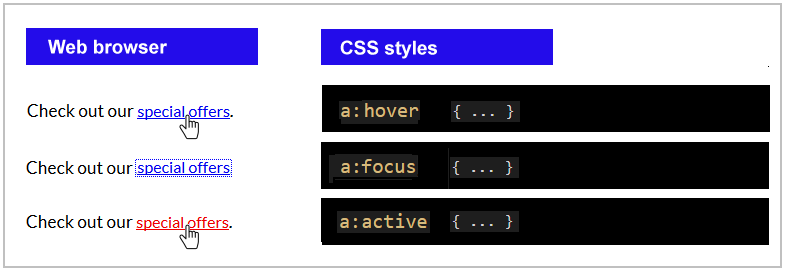
Browsers tend to show links in blue with an underline by default, and they will change the color of links that have been visited to help users know which pages they have been to.
How to style links ?
- a:link - a normal, unvisited link.
- a:visited - a link the user has visited.
- a:hover - a link when the user mouses over it.
- a:active - a link the moment it is clicked.
There are several image formats :
- TIFF (tif, tiff)
- GIF (gif) GIF or Graphics Interchange Format files are widely used for web graphics, because they are limited to only * 256 colors, can allow for transparency, and can be animated. …
- PNG (png)
- EPS (eps)
- RAW Image Files